
The Microsoft Foundry extension for Azure Developer CLI reached 1.0, Foundry Local can run Qwen3.8-27B for local coding, and the GitHub Copilot impact dashboard now counts chat and VS Code agent usage.
Microsoft and GitHub published three items worth a look. The Microsoft Foundry extension for the Azure Developer CLI (azd) is generally available at version 1.0. Foundry Local can run a coding agent on your own GPU with the Qwen3.8-27B model. And the GitHub Copilot impact dashboard now counts chat and VS Code agent usage.
| azd Foundry extension 1.0 | Nov 5 | Agent and deployment settings live in azure.yaml, and azd covers local testing through deployment |
| Foundry Local with Qwen3.8-27B | Nov 5 | Run Qwen3.8-27B on your GPU and connect it to GitHub Copilot with BYOK |
| Copilot impact dashboard | Nov 6 | The Agent adoption chart adds Copilot Chat and the VS Code Agents window, for nine features |
The Microsoft Foundry extension for Azure Developer CLI reaches 1.0. azd provisions Azure resources and deploys application code. With the Foundry extension bundle (microsoft.foundry) now at 1.0, it also sets up agents and tests them locally. Agent and deployment configuration stays in azure.yaml beside your code, so a change to the agent and a change to its deployment can be reviewed in the same pull request. According to the post, local runs and CI/CD use the same deployment configuration, and you can watch local requests and responses in Agent Inspector while you change prompts, tools, or code.
Image: Azure SDK Blog
The post walks through a hosted agent. In Foundry, a hosted agent runs your own agent code on managed compute: you choose the framework and orchestration logic, and Foundry manages the runtime. You need azd 1.37.0 or later (run azd update on an existing install), a current uv, Python 3.13 or later for the sample, an Azure subscription, Foundry permissions, and model quota in your region. The post states that provisioned resources and model usage incur Azure charges.
After initialization the flow is as follows. azure.yaml records the model deployment, the agent source and runtime, the compute allocation, and the dependency on the Foundry project. azd provision creates the declared resources, and azd ai agent run installs dependencies and opens Agent Inspector for the local agent, with model calls still going to your Azure deployment. From a second terminal you call it with azd ai agent invoke --local "...", then ship it with azd deploy. The source is uploaded to Foundry for a remote build, so no local container build is needed, and the output includes playground and endpoint links.
Before deploying you can preview hosted-agent configuration changes with azd deploy --preview, stream logs with azd ai agent monitor --follow, and diagnose setup or permission problems with azd ai agent doctor. The Evaluations extension (azure.ai.evaluations) adds azd ai eval generate to create test data and a grading rubric, and the post suggests keeping that configuration with your code as well.
Local coding agents in Foundry Local. This is a vendor post: Microsoft is introducing its own product. Its argument is that cloud-only assistants can run up costs, send sensitive context over the network, and stall when the connection drops, and that local inference changes that trade-off. Foundry Local runs Qwen3.8-27B on your machine and lets you connect it to GitHub Copilot with BYOK (Bring Your Own Key). The benefits it names are predictable inference costs, more privacy, and the ability to work offline.
Image: Microsoft Foundry Blog
On requirements: with 4-bit quantization the model is about 18 GB, which fits a consumer GPU with 24 GB of VRAM and a context window of up to 64K tokens. A GPU with 32 GB or more can use the model's maximum of 262K tokens. The optimization is built on ONNX Runtime, and Microsoft lists speculative decoding (DFlash2), CUDA graph fusions, INT4 weight handling, KV-cache quantization, CPU offloading, prefix caching, and continuous batching.
Every number in this post comes from Microsoft. The benchmark scores below are what the post presents as published results for Qwen3.8-27B, and the comparison test was run by Microsoft itself. It compared Foundry Local with llama.cpp on the 4-bit model, using an NVIDIA GeForce RTX 5090 with 32 GB of VRAM and an NVIDIA DGX Spark with 128 GB of unified memory, on a dataset of real GitHub issues. Microsoft reports that Foundry Local generated faster at every prompt length tested, with the gap widening beyond 131K tokens. These are not our measurements, so results on your hardware may differ.
| Terminal Bench 2.1 | Agentic terminal coding | 73 |
| SWE-bench Pro | Agentic coding | 61.7 |
| NL2Repo-Bench | Repo-level code generation | 42.3 |
| DeepSWE 1.1 | Agentic coding | 42.2 |
The setup in the post goes like this. You need an NVIDIA GPU with at least 24 GB of VRAM and Foundry Local CLI 0.13.0 or later. The CUDA and compatible cuDNN runtimes are not downloaded by Foundry Local, so you install them yourself.
foundry model load starts a download if the model is not on the machine yet. Use the API endpoint that foundry server status reports on your computer, not the port shown in the post's screenshot. In the GitHub Copilot app, open Settings, choose Model providers, then Add provider and Foundry Local, enter that endpoint as the Base URL, and add Qwen3.8-27B from Browse Catalog.
Chat and the VS Code Agents window in the Copilot impact dashboard (November 6). The Agent adoption chart now includes Copilot Chat and the VS Code Agents window, so you can see engagement across nine Copilot features. GitHub explains that chat is a core Copilot experience that the dashboard did not show, and that people who mainly used chat were labeled passive. The "Passive users" cohort is therefore now called "Chat-first users".
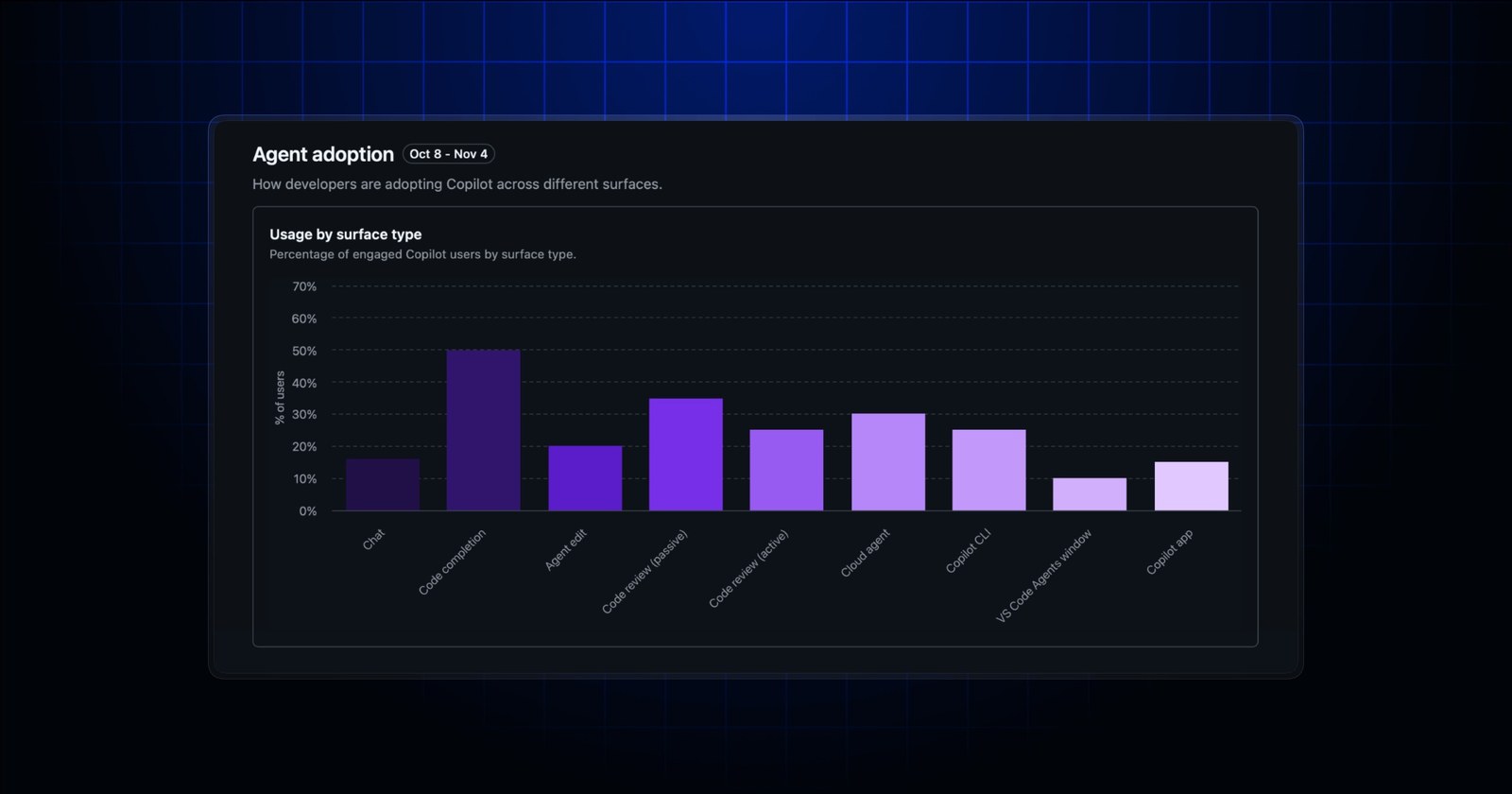
Image: GitHub Changelog
What changed and what did not:
- Changed: the enterprise and organization 28-day reports and API (
copilot_feature_engagement.totals_by_feature) gainchatandvscode_agententries. - Engagement rule: as with the other features, a user counts as engaged after using the feature on at least two days in the 28-day period. One user can be counted under several features, and chat includes agent mode, so people who make agent edits are counted under chat too.
- Unchanged: adoption phases stay the same. Chat and the VS Code Agents window are reported as feature engagement but do not count toward adoption phases. Chat-first users are still the
No Cohortvalue in the API, and cohort sizes do not change. - Scope and access: like the other seven features, they appear only in enterprise and organization 28-day reports, and reports for periods before this change contain only the original seven. Enterprise owners and billing managers, organization owners, and custom roles with the
View Copilot Metricspermission can see the data, and the Copilot usage metrics policy must be enabled.
We covered another addition to the same usage metrics API, code review metrics, in Agents and GitHub: storage design and review metrics.
These three items sit at different stages: deploying an agent, running one locally, and measuring how it is used. It helps to decide how you will look at cost and usage together. Deploying with the Foundry extension brings Azure charges for resources and model usage, so when you review azure.yaml it is worth reading the model deployment capacity and the compute allocation in the same pass. Local coding is attractive because its cost is predictable, but the speed comparison was run by Microsoft, so if you have a 24 GB GPU, try it on your own repository first. On the dashboard, one user can be counted under several features, so it is better not to add the per-feature numbers together and read the total as a head count.
- Microsoft Foundry extension for Azure Developer CLI is generally available, Azure SDK Blog
- Bring Agentic Coding On-Device with Foundry Local, Microsoft Foundry Blog
- Copilot impact dashboard adds chat and VS Code agent usage, GitHub Changelog