
Proton introduced Lumo Desktop on November 17, and Spotify widened its audiobook tools to 21 more markets on November 18. Lumo lets you set what runs, needs approval or is blocked. Spotify has authors preview each chapter and approve before anything goes live. Where does each put the human stop?
On November 17, Proton released Lumo Desktop, a desktop app for Windows, macOS and Linux, and introduced Connectors, Schedules and Skills. One day later, on November 18, Spotify widened its audiobook creation tools for self-published authors to 21 more markets. In one product an AI assistant works directly in the user's apps and tools. In the other, AI voices read a book aloud to make an audiobook. The products differ, but the screen design question is the same: where should a person be able to stop what the AI has done?
| Proton Lumo Desktop | November 17 | Uses Connectors, Schedules and Skills in a desktop app |
| Spotify for Authors audiobook creation tools | November 18 | Turns an .epub manuscript into an audiobook and widens to 21 more markets |
 Image: Proton blog
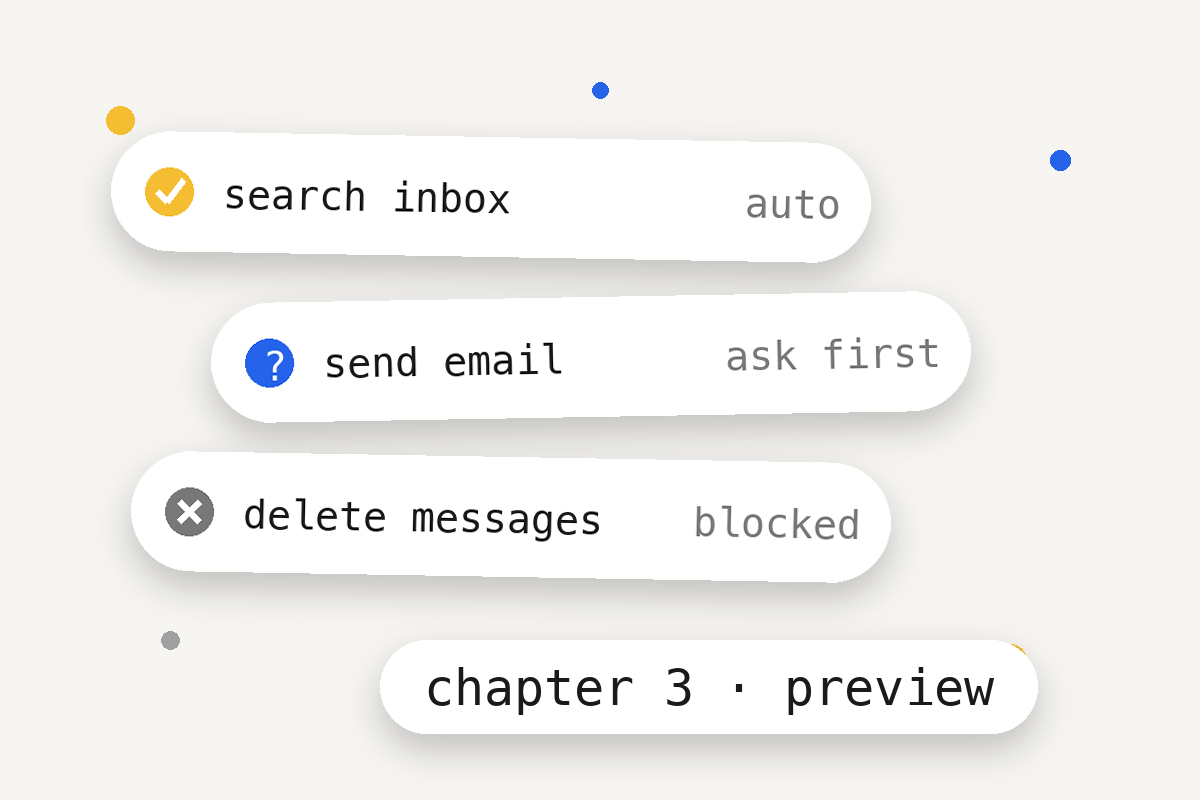
During setup, Lumo's Connectors let you choose which actions Lumo runs automatically, which need approval and which are blocked. Proton's example lets Lumo search the inbox, requires approval before it sends an email, and blocks it from deleting messages. All three are work on the same mailbox, yet reading, sending and deleting each get a different line.
| Search the inbox | Runs automatically |
| Send an email | Runs after approval |
| Delete messages | Blocked |
Connectors reach a wide range of places. Proton lists these:
- Local tools: file system access, shell execution and fetching browser content
- Proton Mail, through Proton Mail Bridge
- Third-party services such as Google Drive for personal files, and work tools such as Jira and Confluence
- Your own local or remote Model Context Protocol (MCP) servers
Schedules run a task at a set time or on a repeat, such as a weekly inbox summary or a monthly spending review. Each task has its own permissions, so you decide per task which actions run automatically and which need approval. You can edit the instructions or the timing, pause a task or delete it. Skills are reusable instructions that Lumo applies across conversations, and existing Custom Lumos become Skills. Proton's post does not publish a permission list for each Connector. It describes setting permissions by kind of action, with the one example above.
Connected tools are enabled in conversations by default. In a conversation's Tools menu you can turn individual Connectors off. On top of the permissions set in settings, there is one more layer for choosing which connections a conversation uses.
- Settings → Conversation (one more layer on top)
Spotify for Authors' Audiobook Creation Tools let eligible self-published authors turn a finished manuscript into an audiobook. The tools launched in the U.S. in September, and starting November 18 they are available in 21 more markets, including the U.K., Canada, Australia, Spain and Mexico. Authors can now also turn a Spanish manuscript into a Spanish audiobook, and the voice library includes new Spanish voices from ElevenLabs. There are five steps.
- Upload → Choose a voice
- Choose a voice → Preview
- Preview → Adjust
- Adjust → Approve
Spotify states that nothing goes live until the author approves it.
Image: Spotify Newsroom
- New markets21
Including the U.K., Canada, Australia, Spain and Mexico
- Markets where books can be published180
Where titles made with the tools can go out
- Free audiobooks per author5
For eligible self-published authors
- Uploaded manuscripts published60% or more
The share Spotify reports
Spotify says the world has about 100 million books, but only about 1 million of them are also available as audiobooks. Since the U.S. launch, Spotify for Authors sign-ups have more than doubled, and nearly two in three new authors have tried the tools. Spotify also says listeners return to these titles at the same rate as to other self-published audiobooks. Using the free tools requires a validated payment profile on file. All of these figures come from Spotify's announcement.
The two products place the human stop in different spots.
| What gets checked | The kind of action (search, send, delete) | The finished result (listen to chapters, approve the audiobook) |
| When a person stops it | Before an action that settings marked as needing approval | Before the author approves, before it goes live |
| What the person sets | Automatic, approval or blocked for each action | The voice, and details such as pronunciation |
Four points from the two cases are worth carrying into a screen.
- Write down the actions that are hard to undo first. Sending mail, deleting messages and publishing a book are examples.
- Make approval the default, and release only the actions you have confirmed are safe to run automatically.
- Let users preview or listen to a result before they confirm it.
- Put the off switch in smaller units such as a conversation, not only on a settings screen.