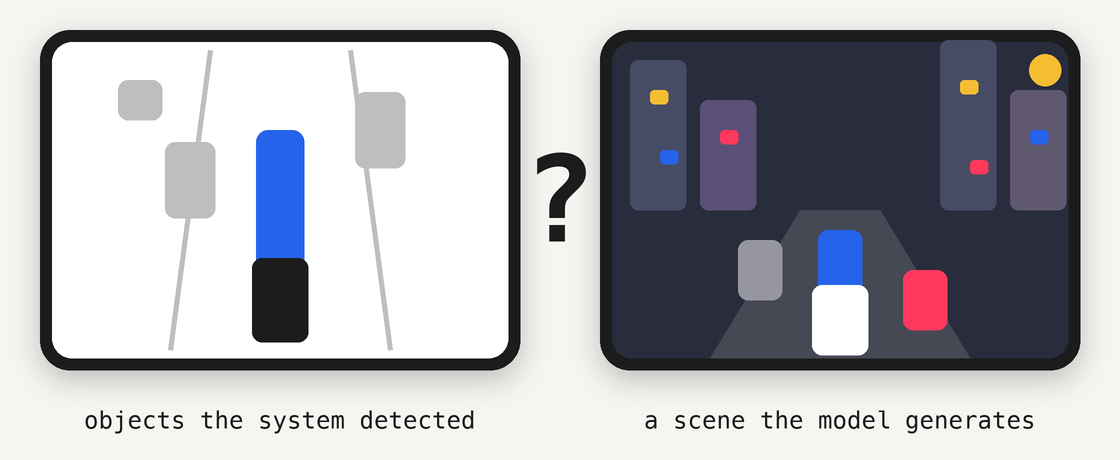
Tesla began rolling out FSD (Supervised) v15 on November 21, 2026 and replaced the driving display with Reality View. Grey shapes for detected objects gave way to a scene generated in real time, so what is on screen can no longer be read as what the car has recognised.
With FSD (Supervised) v15, Tesla replaced the whole driving display. The new display is called Reality View.
| Rollout | Started on November 21, 2026 with a first batch of customers. The number of cars and the regions are not public | Reports quoting X posts by Tesla and Ashok Elluswamy |
| The display | The driving view drawn with grey shapes is now a scene generated in real time | Release notes |
| The criticism | The more realistic the picture, the harder it is to tell from the screen what the car has recognised | Analysis by Not a Tesla App |
This post starts with a car, but the question is wider. Anyone building an agent or a generative feature runs into it: users need to be able to tell whether a screen shows facts the system has confirmed or a picture it has made to look plausible.
Image: Drive Tesla
The old driving display drew the vehicles, lanes and people the car detected as grey shapes. It did not draw the buildings or the sky around them.
The release notes introduce Reality View as a real-time generative driving visualization. They say it continuously streams a view from an arbitrary virtual camera above the vehicle, and that the driver can see and control what FSD is planning to do.
Ashok Elluswamy of Tesla explained on X that the view comes from the same model that does the driving. He also said its purpose is to communicate the car's intent. The blue path ahead of the car is still there in the new display.
Image: Not a Tesla App
Nehal Malik of Not a Tesla App pointed out a weakness of the new display in a post on November 23. What follows is the author's analysis, not Tesla's explanation.
The old display drew what FSD detected fairly directly. If a red light or the car ahead was on screen, the driver could take it that the car had noticed it. Malik sees Reality View as closer to camera video mapped onto 3D shapes. In that case, appearing on screen is no longer evidence that the car has recognised something.
| An object standing up in 3D | The car has probably detected that something is there | Whether the car knows what it is |
| Flat elements such as crosswalks and traffic lights | Nothing | Whether the car detected them or they are just part of the video |
| A reflection in glass or water | Nothing | Whether the car separates the reflection from a real object |
A roundup of owner videos on the same site, posted on November 24, has a similar passage. On a foggy day the road is hard to see through the windshield, yet the display draws it clearly. The post adds that this clear picture does not prove FSD perceives the road that clearly.
Malik also gives the background. Earlier versions of FSD relied on drivers using the display to confirm what the car saw. Now that FSD is more capable, that matters less, and in the author's view Tesla is clearly moving away from showing exactly what the car sees and reacts to.
No response from Tesla to this point has been reported.
Here are Malik's criteria applied to the five real screens in this post, one at a time. The middle column is what you can see in the frame. The right column is what the frame alone cannot settle.
| City at night | Buildings, shop lights, parked cars, a crosswalk, the blue path | Whether the car detected the crosswalk and the signs. Flat elements may just be part of the video |
| Highway at dusk | The blue path, arrows for the next turn, cars in the next lanes | How the car classified the vehicles in the next lanes |
| Rooftop car park | An arrow on each parking bay, the railing, the view in the distance | On what basis the car treated those bays as selectable. The sources do not explain it |
| Map view | The route, the next turn, parking lot labels | Nearby vehicles and people. This view has no driving scene |
| Quiet view | Speed, the speed limit, the next turn, the arrival time | Everything about the surroundings |
Across the five frames, the elements with a clear meaning are the blue path, the turn arrows and the parking spot arrows. All three show what the car is about to do, not what it saw. Everything else is drawn realistically, but that realism says nothing about how accurate the perception is.
The new display shows less of what the car perceives. In exchange, it draws what the car is about to do directly into the scene.
| Blue path | The route the car intends to take | X post by Ashok Elluswamy |
| Turn arrows | The direction of the next turn, shown inside the driving scene instead of beside a map | Release notes and Elluswamy's X post |
| Pin | The spot where the car intends to park | Elluswamy's X post |
| Parking spot arrows | Pick a spot on screen and the car usually pulls into it | Video roundup by Not a Tesla App |
The release notes list two more parking changes. Parking location selection now draws on the driver's parking history, and when a destination has several parking options the map shows them together.
Letting the driver pick a parking spot on screen is worth a second look. Until now the driving display was something to watch. It is now also an input surface, where pressing an object in the scene changes the car's plan.
Reality View does not always fill the screen. According to the release notes, the driver chooses how much the screen shows.
| Fullscreen | The driving scene fills the screen |
| Maps | Only the map |
| Split | The driving scene and the map side by side |
| Quiet mode | Described in the release notes as a mode for a calming cabin experience |
Sound moves in the same direction. The release notes say turn signals are quieter and fade out after a few clicks.
The next two items are not Tesla's official wording. Not a Tesla App lists them separately as changes that are not in the release notes.
- In the mode the site calls Calm Mode, the driving scene and the map are both hidden, leaving only speed, the speed limit, the next turn and the arrival time.
- The disengagement menu that used to appear when turning FSD off is gone.
No published image of the split view was found at the time of writing.
Nothing in this section comes from Tesla documentation. It rests on remarks Elon Musk made on X, as quoted by Not a Tesla App and Tesla North.
- Size of the view model1billion
parameters, roughly
- Frames per batch8frames
the last one feeds the next batch
- Frame rate36fps
video sized for the car screen
- Latency that could be cut35%
roughly, with no date given
According to Musk, Tesla has had a pixel-perfect world model since last year and uses it to create synthetic training data for FSD. What runs in the car is a much smaller model.
- Camera video → FSD vision encoder
- FSD vision encoder → Driving model
- FSD vision encoder → Separate model that draws the view
- Separate model that draws the view → Batch of eight frames
- Batch of eight frames → Car screen
The view model branches off from the same encoder data as the driving model. It takes the previous Reality View frame, adds some noise, and removes it to produce the next frame. Each cycle yields a short clip of eight frames, and the last of them becomes the input for the next batch. In other words, the picture is not drawn from scratch out of camera video each time. It is continued from the picture drawn just before.
Compute is tight. According to the report, Reality View gets only part of one of the two chips in the car's computer. Musk acknowledged that latency is a bit high because of that constraint. He also said there is a way to cut about 35% of it and that the upcoming AI5 chip will perform much better, though none of that was an announcement to owners with a date. Malik notes that more frames and a higher frame rate are among the most requested improvements.
The same post covers an attempt to rebuild Reality View independently. Ryan, a YouTuber who goes by vogel, used about 13 minutes of footage from the six cameras of a Model 3.
| Locating the cameras | Details visible in overlapping views, such as a crack in the road, were lined up to work out where each camera sits. Along the way the cameras turned out to be up to 8.7 ms out of sync with each other |
| Building the 3D scene | Depth was estimated from the video and the scene around the car was built with Gaussian splats |
| Refining | A loop compared the renders with the real camera images and nudged the scene closer each round, for about three hours |
| Handling moving cars | Moving cars were cut out of the scene, tracked separately and replaced with clean 3D models |
Ryan said that pure diffusion and AI image generation were also tried and all failed. Ryan also believes Tesla does something similar in 3D and then uses a diffusion model for the last 10% to make it look realistic. That is Ryan's guess, not something Tesla has confirmed. The remark that Tesla likely corrects the camera timing offset in software is the report's own assumption as well.
On November 24, Not a Tesla App collected videos that owners posted on X. Frames from those videos are not reproduced here. What follows is that post's own summary.
| Home garage | The inside of the garage was drawn down to the boxes and clutter on the floor | Shown together with FSD pulling into the garage |
| Reversing | A view of the surroundings from above appeared, instead of only the backup camera | None |
| Fog | A road barely visible through the windshield was drawn clearly | The post notes that a clear picture does not prove what FSD perceives |
| Rain | Reflections on wet pavement were drawn, and wet and dry patches were told apart | None |
| Downtown | Pedestrians, storefronts, billboards and streetcars were drawn | None |
The same post lists early driving problems. Shallow potholes, water-filled potholes and sunken manhole covers are still not avoided well. In one video the navigation expected a parking spot that did not exist, and the car stopped in the middle of a dead-end road. In another, the car moved back and forth in front of a double speed bump in a car park until the driver nudged it over.
What these cases show is that the quality of the picture and the quality of the driving decision move separately. A pothole drawn on screen is no guarantee that the car will avoid it.
Putting the two displays under the same headings shows what was gained and what was given up.
| What the picture is made of | Detection results | A scene generated by a model |
| What the user reads | What the system saw | What the system is about to do, plus realistic surroundings |
| What the screen confirms | Whether something was detected | Intent such as path, turns and parking spot |
| Weakness | Crude, with no surrounding context | No way to tell what was detected |
The same distinction carries over outside the car. When designing an AI-written summary, a preview or a progress screen, three questions are worth asking.
- Is this element on screen a fact the system confirmed, or something it filled in plausibly?
- Can the user tell the two apart on the screen?
- When the difference matters, is there a way to see only the facts?
The rollout is at an early stage, and outlets differ on a few points.
| Supported hardware | Drive Tesla expects it to be limited to HW4 cars with the AMD Ryzen processor. Tesla North says only that v15 is for AI4 and that HW3 is on a separate track. Tesla has not stated a requirement |
| Wide release | There are reports that Musk mentioned December |
| The 25x improvement | A figure Tesla gives on its own metric. Tesla North notes that it does not mean 25 times safer |
| Outside North America | Not confirmed, including for South Korea |
A realistic screen earns trust. It does not supply grounds for that trust. Watching a display that draws a night street down to the shop signs, it is easy to feel the car understands the whole street. All the screen actually tells you is that a model can draw that scene.
There seems to be a reason Tesla cut back on perception and added intent: the path, the arrows, the pins. For someone supervising, what the car is about to do is more urgent than what it saw. Still, the feature keeps Supervised in its name. At a stage where supervision is the driver's job, losing the screen that showed what was detected is a real loss. Not a Tesla App shows the old and new displays side by side for comparison, and I would like to be able to switch like that inside the car.
If you build AI features alone or in a small team, three things are worth checking in your own product. See whether an AI-written summary or preview marks which parts are confirmed and which are filled in. See whether the system shows what it is about to do before it does it. Finally, check that users can choose between a mode that shows less and a mode that shows more.
- Not a Tesla AppFSD 15 Release Notes (opens in a new tab)The release notes as reproduced
- Not a Tesla AppHow Tesla's FSD V15 Reality View Actually Works (opens in a new tab)How it works and where it falls short
- Not a Tesla AppMost Impressive FSD V15 Visualizations (opens in a new tab)Roundup of owner videos
- Tesla NorthTesla Starts Rolling Out FSD v15 With a New Reality View (opens in a new tab)The rollout and the 25x figure
- Drive TeslaTesla Reality View takes FSD visualizations to a new level (opens in a new tab)Display modes and expected hardware
- XTesla Super Intelligence on X (opens in a new tab)The post announcing the rollout
- XAshok Elluswamy on X (opens in a new tab)The post explaining arrows and pins